
Wireless design transfer
Send compatible embroidery designs from Artspira or a Windows computer through your wireless network.
Sew, quilt, personalise and embroider with one compact creative machine. The Brother Innov-is M370 combines 181 sewing stitches, 135 embroidery designs, wireless design transfer, a 3.7-inch colour touchscreen and a 100 × 100mm embroidery area in an approachable machine made for home creativity.

The Innov-is M370 is designed for sewists who want to explore embroidery without giving up the practical capabilities of a complete computerised sewing machine.
Use sewing mode for garments, alterations, quilting, appliqué, decorative stitching, stretch fabrics and automatic buttonholes.
Attach the embroidery unit and included hoop to add names, monograms, florals, appliqué motifs, quilt labels and personalised details measuring up to 100 × 100mm.
Built-in wireless LAN also connects the M370 with Brother’s Artspira app and compatible computer software, making it easier to transfer additional embroidery designs.
The M370 includes the main equipment required to begin everyday sewing, automatic buttonholes, decorative stitching and machine embroidery.
Send compatible embroidery designs from Artspira or a Windows computer through your wireless network.
Preview embroidery in colour, select stitches and make design adjustments through the touch display.
Begin creating immediately with florals, appliqués, alphabets, frames and decorative motifs.
Add embroidered names, initials, numbers, dates and phrases in multiple lettering styles.
Choose utility, stretch, quilting, satin, decorative and character stitches for everyday sewing.
Trim both upper and bobbin threads at the end of sewing or embroidery using one button.
Thread the needle using Brother’s lever-assisted system with minimal close-up handling.
Receive an on-screen warning when the upper thread breaks or the bobbin thread becomes low.

The 82 × 45mm display gives you direct access to sewing stitches, embroidery designs, lettering and machine settings.
Embroidery designs are shown in colour before stitching begins, helping you understand the layout and colour sequence.
On-screen editing tools allow compatible designs and letters to be combined and positioned inside the hoop area.
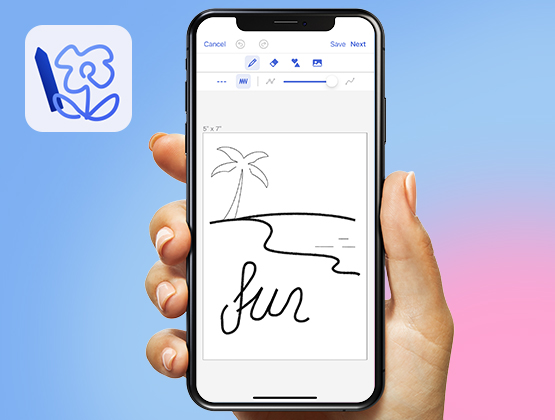
Artspira is Brother’s mobile design app for compatible wireless embroidery, sewing and ScanNCut machines.
Browse embroidery content, personalise supported templates and create compatible designs from your phone or tablet.
Once the M370 and mobile device are connected, compatible embroidery data can be transferred wirelessly to the machine.
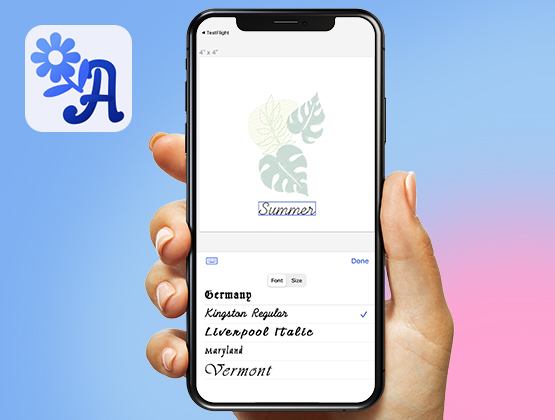
Artspira requires a compatible mobile device, Brother account and internet connection. Both the machine and mobile device must be correctly connected when transferring embroidery designs.
Brother’s free Design Database Transfer application allows compatible embroidery files to be organised and sent wirelessly from a Windows computer to the M370.
Thumbnail viewing makes it easier to browse design folders and identify embroidery files before transferring them.
Compatible designs may also be loaded through the machine’s USB connection when a physical flash drive is preferred.
A practical 4 × 4-inch format for names, monograms, quilt labels, motifs and personalised gifts.
The included hoop is well suited to the compact projects many new embroidery owners want to create first.
Designs can measure up to 100mm high and 100mm wide within a single hooping.
Smaller motifs and letters can be combined on the touchscreen, provided the finished layout remains inside the available field.

The built-in collection lets you begin embroidering without first purchasing separate design files or software.
Choose from decorative motifs, colourful patterns, youthful appliqués, alphabet designs and frame combinations.
Designs can be combined with built-in embroidery lettering to create personalised layouts.
Add names, dates, initials, numbers and short phrases as true machine embroidery.
Lettering can be entered on the touchscreen, adjusted to fit the available field and combined with compatible embroidery designs.
Personalise towels, bags, clothing and children’s items.
Create initials for gifts, linen and home accessories.
Add the maker’s name, date and a short message.
Create compact personalised products within the 100mm field.
The embroidery unit moves the hoop automatically while the needle forms each area of the selected design.
When a colour section is complete, the machine stops so the upper thread can be changed for the next colour.
The automatic thread cutter trims the upper and bobbin threads at suitable stopping points.
Remove the embroidery unit and use the M370 for garments, repairs, quilting, home décor and creative sewing.
The stitch package includes utility, stretch, overcasting, quilting, decorative and character stitches.
Four sewing fonts can be used for names, labels and decorative text formed while the fabric feeds beneath the presser foot.
Practical construction, stretch, quilting and decorative options for everyday home sewing.
My Custom Stitch allows original decorative sewing patterns to be created by placing stitch points on a grid.
Completed stitches can be saved in the machine’s memory and selected again for future projects.
These are sewing stitches rather than embroidery designs. The fabric continues feeding beneath the presser foot while the pattern is formed.
Place the button into Buttonhole Foot A and the machine uses it to determine the required buttonhole length.
The complete buttonhole is sewn automatically in one continuous operation, supporting consistent sizing across garments and home projects.

Follow the clearly marked upper-thread path and use the threading lever to guide the thread through the needle eye.
Insert the bobbin from above, guide the thread through the marked path and begin sewing without manually drawing up the bobbin thread.
An independent bobbin-winding motor allows a bobbin to be prepared without engaging the sewing mechanism.
Press the thread-cutter button and the M370 trims both the upper and bobbin threads.
This is useful at the end of sewing seams and between stages of an embroidery project.
Upper-thread and bobbin sensors also help reduce interruptions by warning you when thread attention is required.
Finish seams without immediately reaching for scissors.
Receive a warning if the upper thread breaks or runs out.
Know when the remaining bobbin thread becomes low.
Reduce manual thread handling between design stages.
Seven feed-dog points maintain contact with the underside of the fabric as it moves beneath the presser foot.
The levelling button on Zigzag Foot J helps the foot move over bulky seam intersections and changes in fabric thickness.
Feed dogs can also be lowered for free-motion quilting, thread painting, darning and button sewing.
Operate the machine without the foot controller when preferred.
Set a comfortable maximum speed for beginners or detailed work.
Move the needle between its raised and lowered positions.
Reinforce suitable construction seams using reverse stitching.
Trim the upper and bobbin threads using one direct button.
Use traditional pedal control when sewing ordinary seams.
The M370 provides approximately 160mm of horizontal room and 105mm of vertical space within the sewing area.
This is well suited to garments, alterations, smaller quilt projects, bag panels and everyday home sewing.
Remove the accessory compartment to expose the free arm for sleeves, cuffs and trouser hems.
Complete everyday seams efficiently, then reduce the maximum speed for appliqué, curves and detailed work.
The Brother Innov-is M370 is a domestic computerised sewing and single-needle embroidery machine. It is not a commercial multi-needle embroidery machine.
Its maximum embroidery field is 100 × 100mm. A physically larger optional repositionable frame does not increase the machine’s maximum stitchable field in one position.
The machine changes embroidery colours manually. It stops at each colour stage so the upper thread can be changed.
Wireless design transfer requires a compatible Wi-Fi network, device and Brother software or app.
Good embroidery requires suitable stabiliser, embroidery thread, bobbin thread, needle choice and secure hooping.
Sewing fonts and My Custom Stitch patterns are feed-through sewing stitches. Embroidery fonts and designs are stitched automatically inside the attached hoop.
The M370 does not include a knee lift, automatic presser-foot lift or adjustable presser-foot pressure.
| Machine type | Computerised domestic sewing, quilting and single-needle embroidery machine |
|---|---|
| Built-in sewing stitches | 181 |
| Sewing fonts | Four |
| Buttonhole styles | Ten automatic one-step styles |
| Built-in embroidery designs | 135 |
| Embroidery fonts | Eleven |
| Maximum embroidery area | 100 × 100mm or 4 × 4 inches |
| Included embroidery frame | 100 × 100mm |
| Colour touchscreen | 3.7 inches diagonal, approximately 82 × 45mm |
| On-screen embroidery editing | Combine, position and edit compatible designs and lettering |
| Wireless LAN | Yes |
| Artspira compatibility | Yes |
| Design Database Transfer | Compatible with the Brother Windows application |
| USB design transfer | Yes |
| Compatible embroidery data | PES, PHC and DST, subject to Brother’s design requirements |
| Maximum sewing speed | Up to 850 stitches per minute |
| Maximum embroidery speed | Up to approximately 400 stitches per minute |
| Maximum stitch width | 7mm |
| Maximum stitch length | 5mm |
| Sewing workspace | Approximately 160mm wide × 105mm high |
| My Custom Stitch | Yes |
| Built-in memory | Yes |
| Automatic thread cutter | Yes, cuts upper and bobbin threads |
| Advanced needle threader | Yes |
| Upper-thread sensor | Yes |
| Bobbin thread sensor | Yes |
| Start and stop button | Yes |
| Needle up/down | Yes |
| Reverse sewing button | Yes |
| Speed-control slider | Yes |
| Bobbin system | Top drop-in Quick-Set Bobbin |
| Bobbin winding | Independent bobbin-winding motor |
| Feed system | Seven-point feed dog |
| Drop feed | Yes |
| Lighting | LED sewing-area light |
| Free arm | Yes |
| Presser-foot pressure | Fixed, not manually adjustable |
| Knee lift | No |
| Pivot function | No |
| Wide table | Not included, available separately where compatible |
| Machine dimensions | Approximately 522mm wide × 219mm deep × 307mm high with embroidery unit fitted |
| Machine weight | Approximately 8.3kg |
| Machine case | Hard case included |
Yes. Its 100 × 100mm hoop, colour touchscreen, built-in design library, advanced needle threader and on-screen guidance make it an excellent first embroidery machine.
Yes. Remove the embroidery unit and use the M370 as a computerised sewing and quilting machine with 181 built-in stitches.
The maximum stitchable embroidery area is 100 × 100mm, or approximately 4 × 4 inches.
Yes. The detachable embroidery unit and 100 × 100mm embroidery frame are included.
It includes 135 built-in embroidery designs.
Yes. Eleven built-in embroidery fonts can be used for names, numbers, dates, initials and short phrases.
Yes. Its wireless LAN connection supports compatible Brother design-transfer services and software.
Yes. Compatible embroidery content can be created, edited and transferred from the Brother Artspira mobile app.
Yes. Compatible designs can be transferred wirelessly using Brother Design Database Transfer on Windows or loaded through a compatible USB flash drive.
Brother supports compatible PES, PHC and DST embroidery data, provided the design remains within the machine’s size and stitch requirements.
No. It is a single-needle machine. It stops at each colour stage so the upper thread can be changed manually.
Yes. The automatic cutter trims both upper and bobbin threads.
Yes. The M370 has both an upper-thread sensor and a bobbin thread sensor.
Yes. Brother My Custom Stitch allows original feed-through sewing stitches to be created and saved.
Yes. The feed dogs can be lowered and a suitable optional free-motion quilting foot can be fitted.
No. A compatible Brother walking foot is available separately.
No. A compatible extension table is available separately.
Yes. It includes stretch stitches suitable for knit garments when used with the correct ballpoint or stretch needle.
It can sew ordinary garment-weight denim with the correct jeans needle, thread and settings. It is not an industrial heavy-material machine.
No. The M370 uses flat embroidery frames. Flat cap panels may sometimes be embroidered before assembly, but finished structured caps require specialist equipment.
It can suit personalised gifts, monograms and small creative runs. A larger-hoop or commercial multi-needle machine is more efficient for frequent production, larger designs and automatic colour changes.
View the current New Zealand specifications, warranty information and compatible accessories.
Review the complete feature summary, technical specifications and included accessory list.
Access the operation manual, quick-reference guide, embroidery guide and current downloads.
Learn about mobile design editing and wireless transfer for compatible Brother machines.
Direct Sewing has supplied sewing, quilting, embroidery, overlocking and industrial equipment throughout New Zealand since 2001.
Our experienced team can explain embroidery hooping, stabiliser selection, Artspira, wireless design transfer, bobbin thread, embroidery needles and the difference between domestic and commercial embroidery systems.
Your Brother Innov-is M370 is backed by authorised New Zealand warranty assistance and our own in-house technical workshop. Servicing and repairs are completed by experienced sewing-machine and embroidery technicians with decades of industry knowledge.
For sewists wanting an affordable and approachable introduction to machine embroidery without giving up a versatile computerised sewing machine, the Brother Innov-is M370 is an outstanding all-in-one package.